
Human Handoff to a Shared Team Inbox.
Human handoff moves the conversation to your team with full context: a shared inbox with queues, SLAs, assignment, saved replies, notes, and AI summaries.
3-day free trial · Monthly or annual billing · Cancel anytime
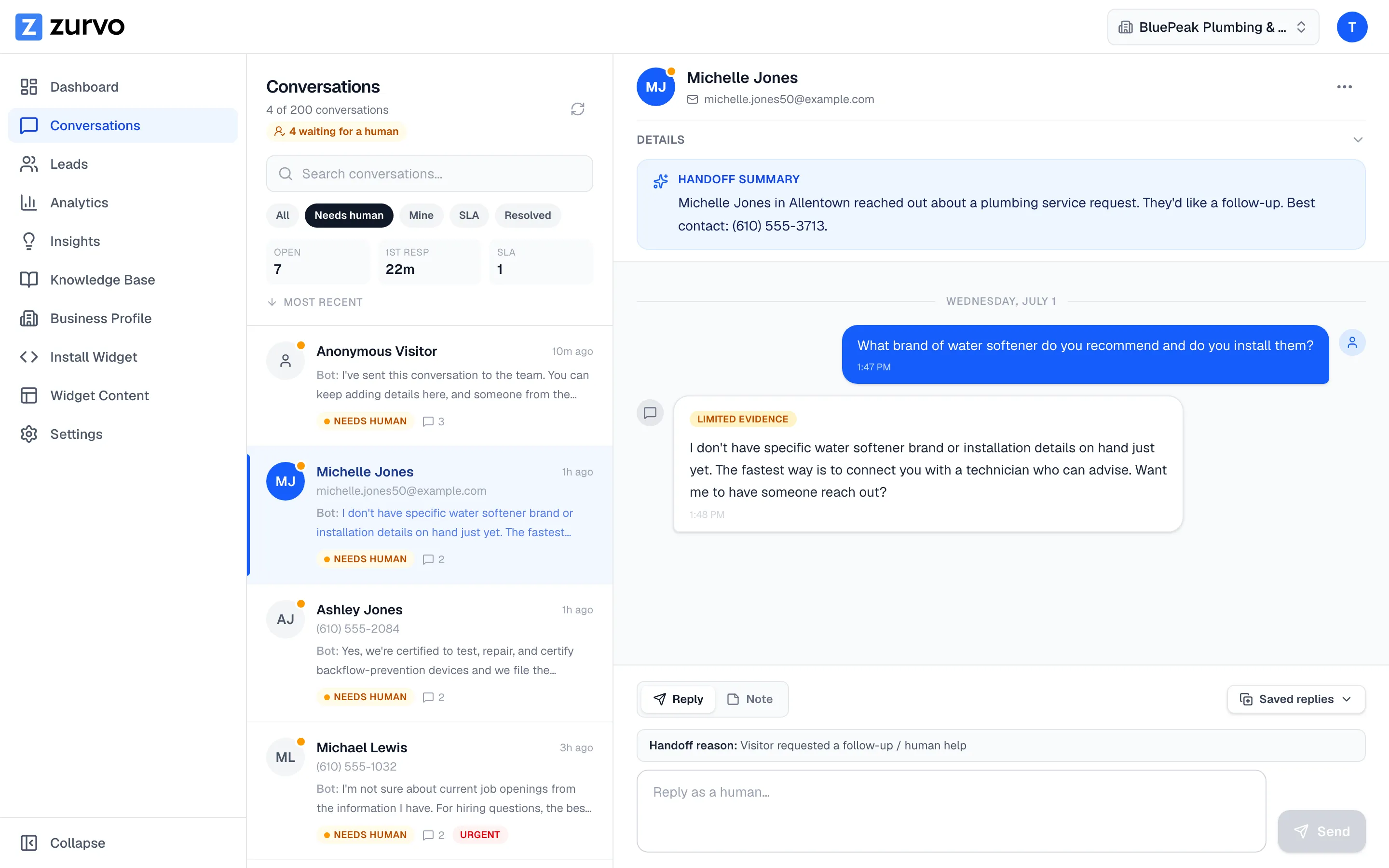
Handoff, not failure
The intended behavior when content can't answer.
In a basic chatbot, "talk to a human" is the button you hit after the bot wasted your time. In Zurvo, handoff is the designed path for anything the chatbot can't answer from your content — and it carries full context so nobody starts from scratch.
- Abstains, hits a sensitive topic, or the visitor asks for a person
- Full history and referenced sources travel with it
- See how the bot decides in Grounded AI
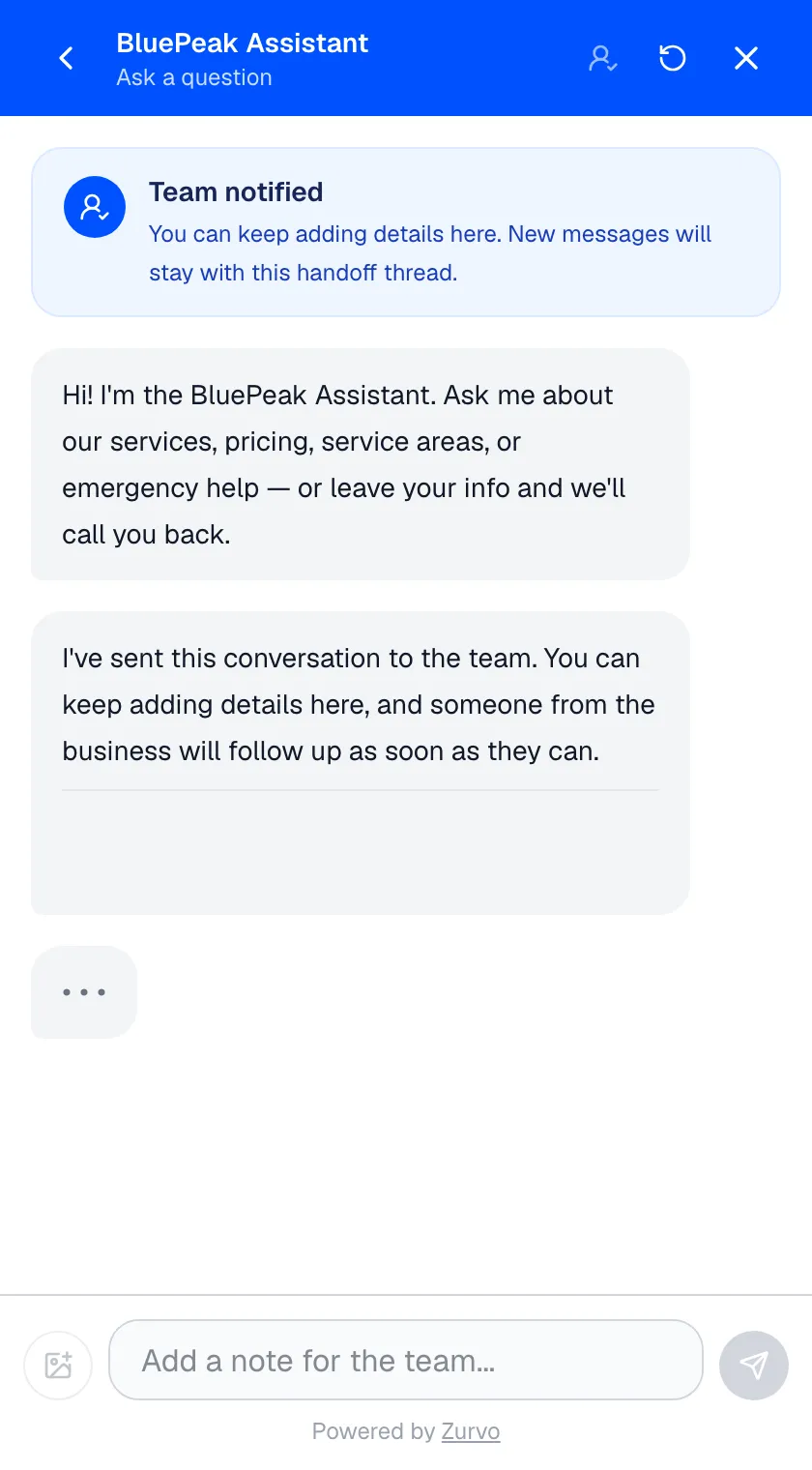
A team inbox built for support
Queues so the right work reaches the right person.
Handed-off conversations land in a shared inbox organized into queues, with the tools support actually needs to work them.
- Needs-human, Mine, SLA, and Resolved queues
- Claim or assign, and set low/normal/high/urgent priority
- Saved replies and internal notes teammates can see but visitors can't
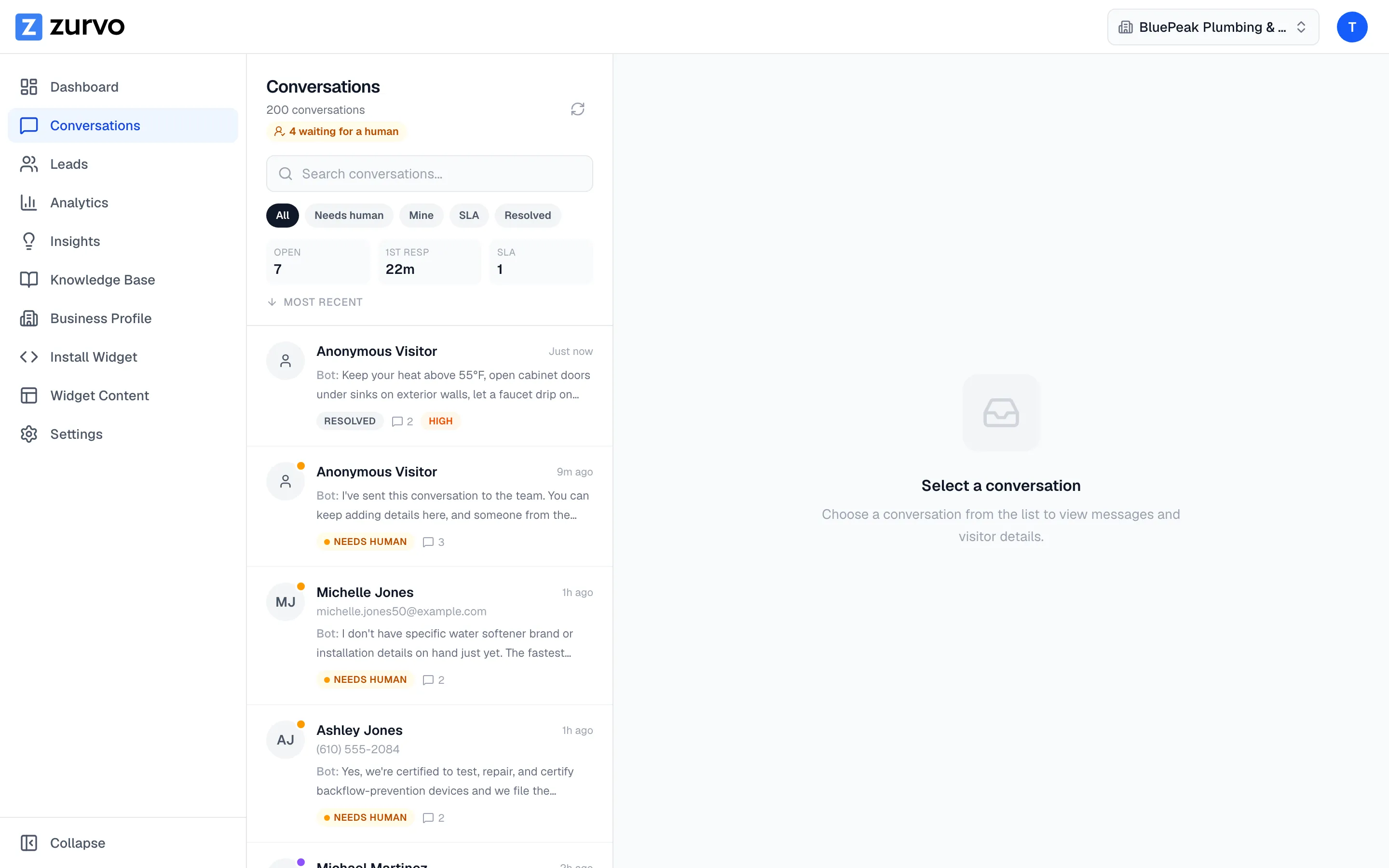
Context that travels
Agents pick up informed, not from zero.
When a conversation moves from the chatbot to a human, the agent sees everything the bot did — so resolution gets faster because the person starts informed.
- Full message history and the sources the chatbot referenced
- An AI-written summary of what the customer wants
- Why it was handed off — edge case, sensitive, or content gap
Notifications and SLAs
Nothing sits unattended.
A handoff no one sees isn't a handoff. Zurvo notifies your team and starts an SLA clock so the at-risk conversations get worked first.
- Emails the owner with a direct link; posts to Slack via webhook when enabled
- SLA clock starts on handoff and records the first human response
- Breaches are flagged in an SLA queue and analytics
Automation that knows its limits.
Zurvo’s chatbot hands off to your team when it can’t answer, carrying the full history, the referenced sources, and an AI-written summary so your agent picks up where the customer is, not from scratch. Handed-off conversations land in a shared inbox with queues, priority, SLA tracking, saved replies, and internal notes. Handoff isn’t a failure state; it’s the designed path, and how the bot decides to take it is covered in Grounded AI. The inbox feeds the content-gap loop in AI Insights under the access rules in Team and Roles and Security and Control — the whole point of agent assist.
Zurvo’s inbox isn’t a full ticketing suite, Slack is a notification rather than a two-way inbox, and SLAs are targets it tracks, not guarantees it staffs. Included on every plan — see pricing. Try it live and watch a handoff happen end to end.
Frequently asked questions.
How does a conversation reach my team?
Three ways: the chatbot abstains because your content can't answer the question, the topic is sensitive or out of scope, or the visitor asks for a human. In each case the conversation moves into your team inbox with its full context attached.
What context does the agent get?
The full message history, the sources the chatbot referenced, an AI-written summary of what the customer wants, and the reason for the handoff — so your agent picks up informed instead of starting from scratch.
How do SLAs work?
You set a response-time target. When a conversation is handed off, Zurvo starts an SLA clock, records the first human response, and flags conversations that breach so your team can work the at-risk ones first. An SLA queue and analytics surface breaches.
How is my team notified of a handoff?
Zurvo emails the owner with a link to the conversation and can post to Slack via an incoming webhook when enabled. Both carry the visitor info and AI summary so your team can triage before opening the dashboard.
Can agents leave notes without the customer seeing them?
Yes. Internal notes are visible only to your team inside a conversation — use them to hand off between agents, flag account history, or loop in a specialist. They're never shown to the visitor.
How does the team inbox organize handed-off conversations?
Handed-off conversations land in a shared inbox organized into queues: Needs human (waiting to be picked up), Mine (assigned to you), SLA (breaching or due against your response target), and Resolved (closed, kept for review). Your team can claim a conversation from the shared queue or assign it to a specific agent, and mark it low, normal, high, or urgent so the important ones rise to the top. Saved replies standardize answers to recurring situations and insert in one click.
Why isn't handoff a failure state?
In a basic chatbot, talk to a human is the button you hit after the bot has already wasted your time. In Zurvo, handoff is the intended behavior for anything the chatbot can't answer from your content — it carries full context so nobody starts from scratch. See how the bot decides in Grounded AI.
Who is the inbox built for beyond front-line agents?
Agents get a focused workspace; team leads get SLA visibility, priority, clear ownership, and a queue-and-response scorecard; and support leadership gets a feedback loop — the questions the chatbot hands off today reveal tomorrow's content gaps, surfaced in AI Insights. Who can see and act on what is governed by roles — see Team and Roles and Security and Control.
What does handoff not do?
It's not a full-featured ticketing suite — Zurvo's inbox resolves handed-off conversations well with queues, SLAs, assignment, and notes, but not every workflow a dedicated enterprise help desk has. Slack is a notification, not a two-way inbox: you get notified in Slack but reply to the customer from the Zurvo inbox where the context lives. And SLAs are targets, not guarantees — Zurvo tracks and flags breaches so your team can act, but it doesn't staff your queue.
How does handoff close the loop over time?
Every handoff is a signal. A cluster of escalations on the same topic is a content gap; fill it and those questions get handled next time. Over time the chatbot absorbs more of the volume and your team spends its hours on the conversations that genuinely need a person — which is the whole point of agent assist.
Turn your website into your best support agent.
Train Zurvo on your content, answer customers with citations, and hand off to your team when it counts.
3-day free trial · Monthly or annual billing · Cancel anytime