
Agent Assist.
Agent assist drafts replies from your own content inside the inbox, so a person reviews, edits, and sends every response.
Not every conversation should be fully automated, and your best agents are too valuable to spend their day retyping the same answers and searching for the right policy. Agent assist is about making each human agent faster and more consistent on the conversations they own — without taking a person out of the loop.
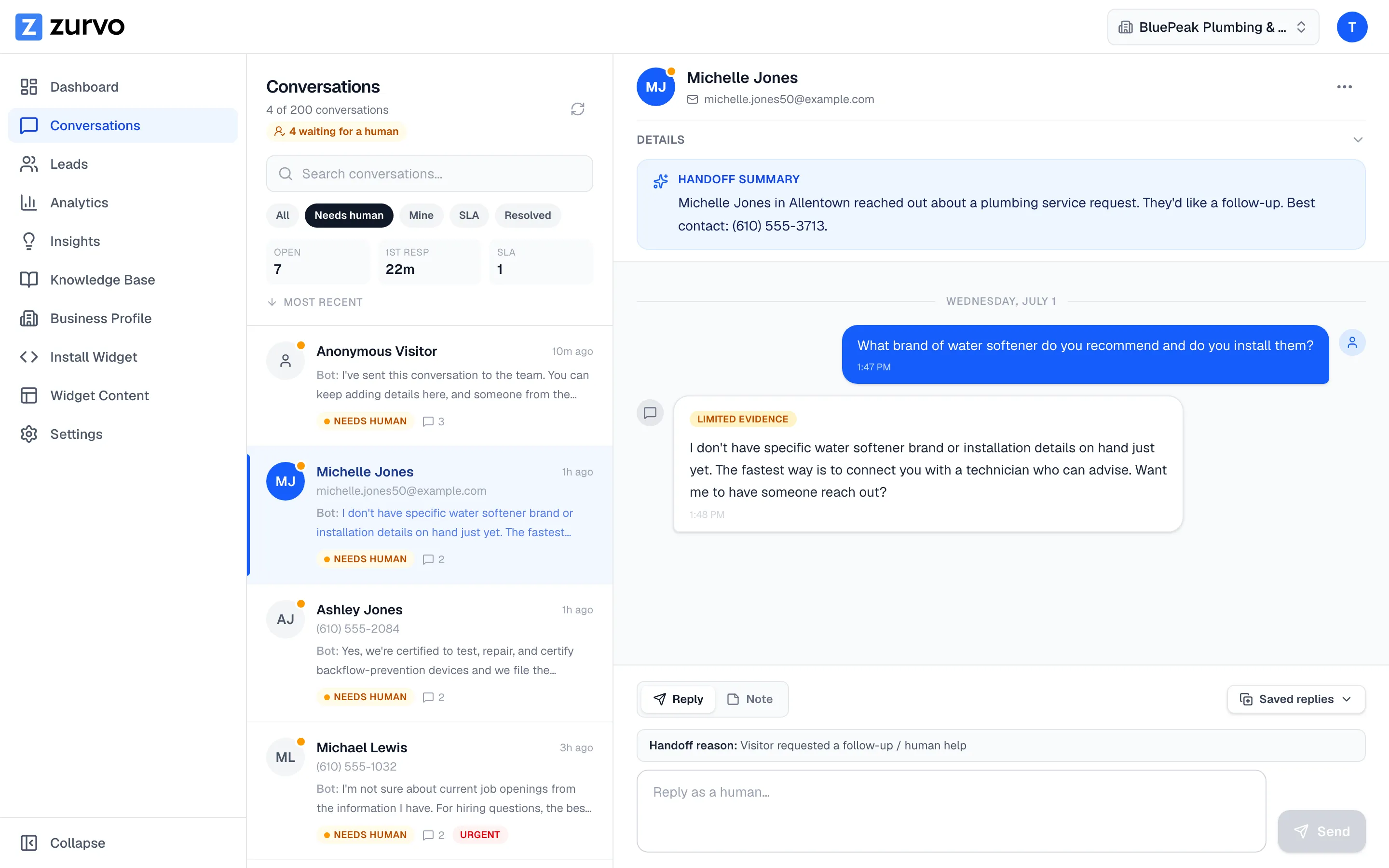
Zurvo agent assist puts the same AI behind your support automation into the hands of your human agents. As a conversation comes in, the AI drafts a suggested reply from your own content, attaches the sources it used, and surfaces the relevant documents — all inside the team inbox. The agent reviews, edits, and sends. The human stays in control of every response. This page covers the in-inbox workflow and when to reach for assist instead of full automation.
A human in the loop, by design.
Agent assist is the clearest expression of Zurvo’s human-in-the-loop approach. The AI never sends on its own. It proposes; the agent decides. That makes it a good fit for conversations that are nuanced, sensitive, or high-stakes — the ones where you want a person’s judgment on every word — while still capturing much of the speed and consistency that automation provides.
Drafts are built from your own content, with the sources attached, so the agent can check where a suggestion came from before sending. When the content doesn’t support a confident draft, the AI says so rather than making one up, and the agent handles the reply directly. See grounded AI answers for the engine behind the drafts.
How agent assist works in the inbox.
- The agent owns the conversation. A customer message lands in the team inbox with SLA tracking, assignment, and full history.
- The AI drafts a reply from your content. Pulling from your own knowledge, it composes a suggested response with sources attached, ready for the agent to use as-is or refine.
- The AI surfaces supporting knowledge. Relevant documents and passages appear alongside the conversation, so the agent doesn’t have to leave the inbox to find the right policy or article.
- The agent edits and sends. Nothing goes to the customer without a human reviewing it. The agent adjusts tone, adds judgment, and sends — faster than typing from scratch.
- Context travels with the conversation. Generated summaries, internal notes, and canned replies keep the whole team aligned, so reassignments and escalations don’t lose history.
Why teams use agent assist.
- Faster handle time. Agents start from a draft instead of a blank box, cutting the time to a quality response.
- More consistent answers. Every agent draws from the same content, so customers get a similar answer regardless of who replies.
- Faster ramp for new agents. New hires lean on suggestions and surfaced sources while they build expertise.
- A human reviews every message. Because a person sends each reply, agent assist fits even sensitive accounts.
Assist and automation, working together.
Agent assist and customer support automation are complements, not alternatives. Let the AI handle the high-volume, well-documented questions directly, and let agent assist speed up your humans on the conversations that need them. Both draw from the same content, so customers get consistent answers whether a question is resolved by the AI or by a person it’s helping. The dial between “AI answers” and “AI drafts, human sends” is yours to set by conversation type.
What the edit signal tells you.
There’s a quiet benefit to a workflow where a human reviews every AI draft: it produces the single most honest measure of how good your AI’s answers really are. When an agent accepts a draft as-is, the AI got it right. When they heavily edit it, something was off — the content was stale, the phrasing missed, or the knowledge was incomplete. When they reject it entirely, the AI was out of its depth. Zurvo’s analytics surface those accept, edit, and reject rates, and they’re a far more trustworthy quality signal than a demo, because every data point comes from a real conversation judged by a real agent. Teams use this to decide which question types are safe to fully automate and which should stay assist-only — you graduate a category to full automation once its drafts are being accepted with little editing. Agent assist thus doubles as the proving ground for your automation strategy.
An honest note on limits.
Agent assist drafts and surfaces knowledge; it does not act on your backend systems, and it never sends without a human. Its draft quality depends on the content you give it. On security: data is isolated per tenant with encryption, RBAC, and audit logs, but Zurvo does not currently hold SOC 2 or HIPAA certification — those are roadmap items, described plainly on security and control.
Where agent assist delivers the most value.
- Teams handling nuanced, policy-bound cases that benefit from drafts with sources attached.
- Situations where a human must own sensitive conversations while still replying quickly.
- High-volume, technically deep queues where faster, more consistent agents make a difference.
Related reading: customer support automation, helpdesk automation, and customer support software.
The outcome
Agent assist shortens handle times, makes answers more consistent across agents, and speeds up ramp for new hires — without giving up the human control that sensitive conversations require. Your agents stay in the driver’s seat; the AI makes each response faster to write.
Drafts from your own content. Sources attached. A human sends every reply. See how it works, review pricing, or try it live to see agent assist drafting from your own knowledge inside the inbox.