
Conversational AI for Customer Service.
What conversational AI for customer service is, how it differs from the button-menu chatbots customers hate, and how a small business can put it to work in about five minutes.
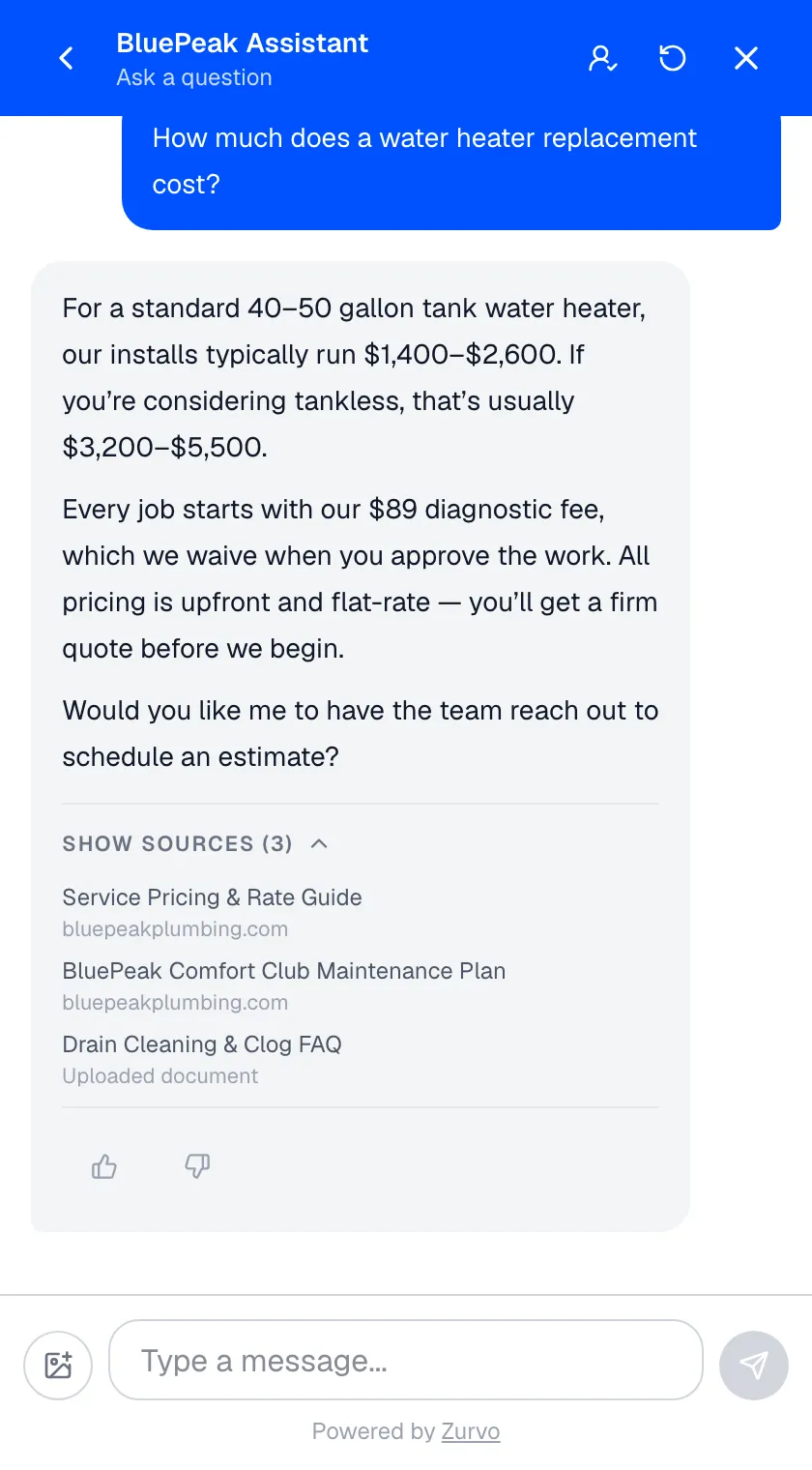
Conversational AI for customer service is software that talks with your customers in plain language — reading each question as written, answering from your business content, and handing the conversation to a person when a person is needed. It is the difference between a website that answers and a website that hopes the visitor finds the FAQ page.
This guide covers what conversational AI is, how it works, where it beats the older generation of chatbots, and what it looks like for a small business — with the limits stated plainly.
Conversational AI vs. the chatbot customers hate.
Most people’s mental image of a “chatbot” comes from the last decade: a widget that offers three buttons, understands none of your typing, and loops back to the menu. Those bots followed decision trees. Every question had to match a script someone wrote in advance, and the moment a customer phrased something the script didn’t predict, the conversation died.
Conversational AI works from the other direction. There is no tree. The customer writes the question the way they’d say it — “my front door screen has a hole, do you come out to Wyomissing, and what does that cost?” — and the AI reads it, finds the relevant parts of your content, and composes one answer covering all three parts. Follow-ups keep the thread: “and how soon?” resolves against the conversation so far, not against a menu.
The practical difference shows up in three places:
- Coverage. A decision tree answers the questions you predicted. Conversational AI answers the questions your content covers — a much larger set, phrased any way.
- Effort. Trees need someone to design and maintain every branch. Conversational AI learns from the website you already keep current.
- Experience. Customers type once and get an answer. No menus, no “I didn’t understand that,” no starting over.
How it works.
Under the surface, a grounded conversational AI system runs four steps on every message:
- Understand the question. The AI reads the message in context — what was asked, what was already discussed, what the customer is on your site to do.
- Retrieve your content. It searches your knowledge base — your crawled website pages, uploaded documents, and business profile — for the passages that answer this question.
- Compose a grounded answer. It writes a reply from those passages, in your business’s voice, and shows the source so the answer can be checked. See grounded AI answers for why this step separates trustworthy systems from improvising ones.
- Act on the outcome. A satisfied customer moves on. An interested one gets asked — at the right moment, not as a gate — whether they’d like the team to reach out, and their name and number land in your inbox. A conversation that needs judgment routes to a person through human handoff, transcript attached.
That fourth step is what makes conversational AI a business tool rather than a novelty. Answering is the job; capturing the lead and routing the exceptions is the payoff.
What it looks like for a small business.
Enterprise vendors write about conversational AI in terms of deflection rates and agent seats. For a small business the picture is more concrete:
- The 9pm visitor gets an answer. Someone checks your site after dinner, asks whether you handle their problem, and gets a specific reply with the source shown — instead of a contact form that answers Monday.
- The same five questions stop reaching you. Hours, pricing, service area, availability, and “do you do X” resolve on the website. Your phone rings for the work, not the FAQ.
- Interest becomes a lead while it’s warm. When a visitor sounds ready, the AI offers to have the team reach out and collects a name and number. You get an email with the contact details and a summary of what they asked. See lead capture.
- The exceptions reach you with context. A conversation the AI can’t finish arrives in your team inbox with the transcript and an AI summary — no customer repeats themselves.
That is the same job description as a front desk: answer what’s answerable, take a message when it isn’t, and never leave the counter unstaffed. Industry pages show the pattern applied: small businesses, plumbers, dentists.
What to require before you trust one.
Conversational AI earns its reputation problem when it improvises. A system that answers from a general model’s memory will, sooner or later, invent a price, a policy, or a service you don’t offer — at 2am, with nobody watching. Before putting any conversational AI in front of customers, require three things:
- Grounding. Answers come from your approved content only — not the open web, not the model’s training data.
- Citations. The reply shows which page it came from, so you and the customer can verify it.
- Abstention. When your content doesn’t cover a question, the AI says so and offers a next step, rather than guessing.
Zurvo is built on all three. When it doesn’t know, it says it doesn’t know — and asks for the customer’s details so a person can follow up.
What it costs, and what it doesn’t do.
Small-business conversational AI prices flat: Zurvo plans start at $39/mo with a 3-day free trial, and the bill is the same in your busiest month — see pricing. Setup takes about five minutes: point Zurvo at your website, let it learn, paste one line of code.
The limits, stated plainly: Zurvo answers website conversations. It does not answer phone calls, send SMS, or book appointments into your calendar — it captures the request and gets it to your team fast. Answers are only as good as the content behind them; the AI Insights report shows which questions your content missed so you can close the gaps.
Where to start.
Read how it works for the full setup path, compare it with automated customer service if your focus is the after-hours workload, or skip ahead: try it live on our site, or point it at yours with a 3-day free trial.