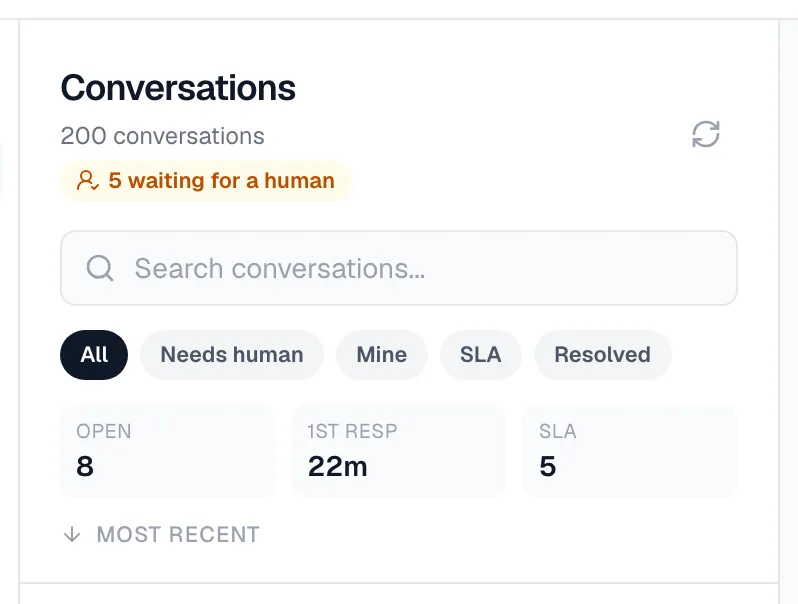
Track handoff SLA and analytics.
Read the handoff queue badge and scorecard in your inbox — open queue, average first response, and SLA breaches — measured over a rolling analytics window.
Zurvo surfaces handoff performance right in the Conversations inbox so you can see load and responsiveness at a glance — no separate report to open.
The queue badge
When one or more conversations are waiting for a human, a badge appears at the top of the inbox showing how many are waiting for a human. It’s a quick signal that there’s work in the Needs human queue. When nothing is waiting, the badge doesn’t show.
The handoff scorecard
Below the queue filters, a three-part scorecard summarizes your handoff performance:
- Open — how many handoff conversations are currently open (waiting, human active, or waiting on visitor).
- 1st resp — your average time to a first human reply, in minutes.
- SLA — how many conversations have breached their first-response deadline.
How first response and breaches are measured
Every handoff sets a first-response deadline based on the response-time target in your handoff settings. When your team sends its first human reply, that moment is recorded and counts toward the average first response. If the deadline passes with no human reply, the conversation shows as an SLA breach and appears in the SLA queue until a human replies.
The fastest way to keep breaches down is to work the Needs human and SLA queues promptly and reply as a human before the deadline.
The analytics window
The scorecard reflects a rolling 30-day window of handoff conversations, so the numbers stay current as older conversations age out and new handoffs come in.