
Chat With Your Website Visitors.
Chat with your website visitors from one inbox: reply as yourself, take over from the assistant anytime, and never miss the after-hours visitor.
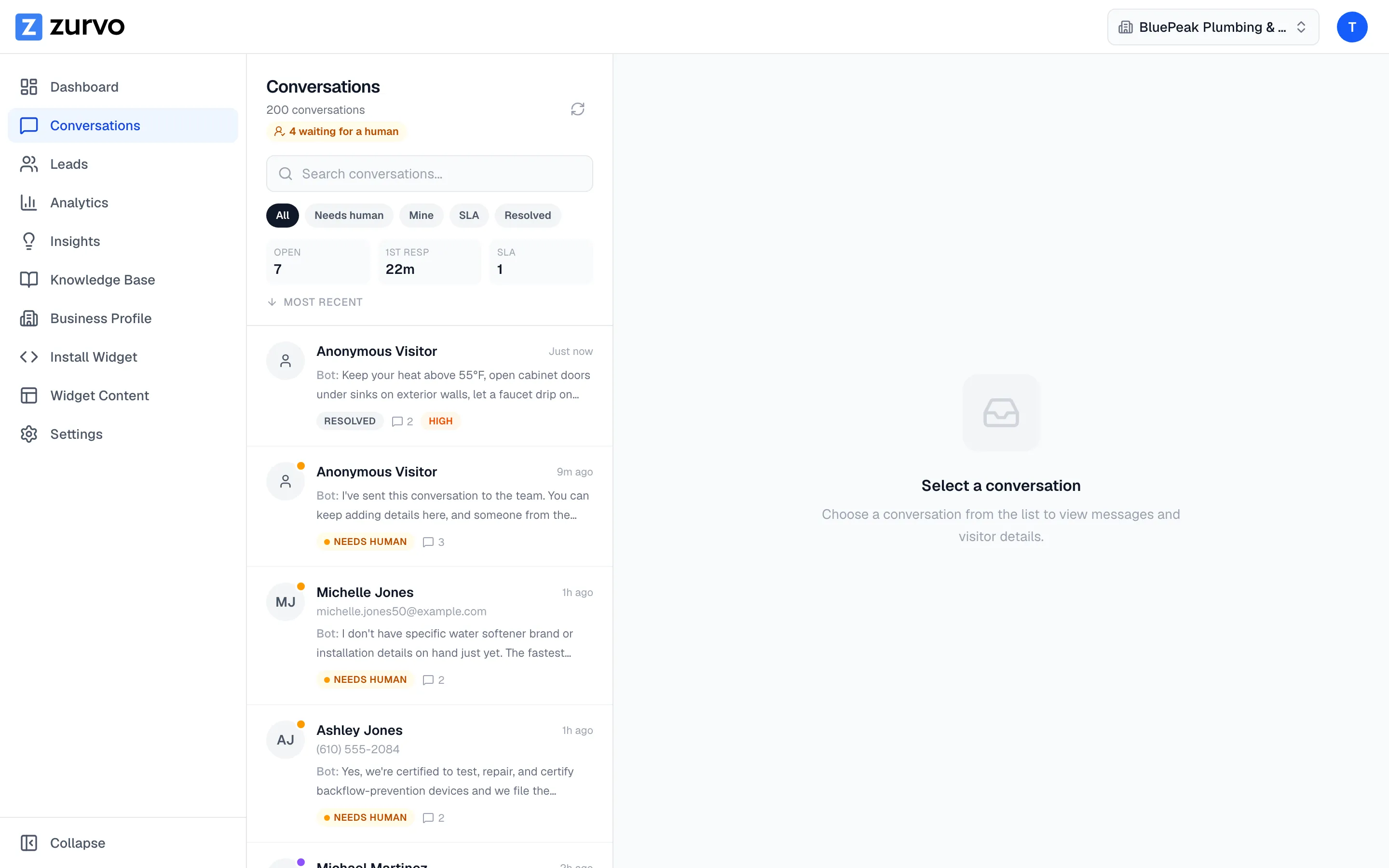
Your website has visitors on it every day, and most of them leave without ever telling you what they wanted. A contact form is a poor substitute for a conversation — it filters out everyone but the most motivated, and the reply comes hours later by email. What you want is simpler: to chat with the people on your site, answer the question in front of them, and turn a browser into a customer.
Zurvo is a website chat widget with a shared inbox: it lets you talk to your website visitors and reply as yourself, take over from the assistant anytime, and still catch the visitor who arrives after hours. It puts that within reach without chaining you to a screen — conversations your visitors start land in one shared inbox where you reply as yourself, an assistant covers the hours you can’t, and you can take over any conversation the moment you want to. This page is the owner’s-eye view: where the conversations live, how you jump in, and how you stop losing the after-hours visitor.
Every conversation lands in one inbox.
When a visitor messages your site, the conversation shows up in your shared team inbox — not scattered across email threads, but in one place built for working them. Conversations are grouped into queues: the ones waiting for a person, the ones assigned to you, the ones running against your first-response target, and the ones you’ve resolved. You see the full history on every conversation, and on a handoff you get an AI summary of what the visitor wants, so you open it already knowing the story.
Do visitors know they’re talking to a real person?
You chat with visitors from the dashboard, and your name shows on your messages in the widget. To the visitor it reads as what it is: a real person answering, not a ticket. The assistant’s replies and yours are clearly distinct in the thread, so there’s never any confusion about who they’re talking to. This is the human touch traditional support tools miss — it’s your conversation with your visitor, and it looks like it.
Take over from the assistant, anytime.
The assistant handles conversations when you’re not in them — but the moment you want to step in, you take over and the assistant goes quiet. Once you join, it steps aside completely, so you and the AI never talk over each other. You might let it field the routine questions and jump in the second something looks like a real opportunity, or take every conversation yourself and let it cover only when you’re away. The control is yours, conversation by conversation. See how answers stay grounded in your content while the assistant is handling things.
Never miss the after-hours visitor.
The visitor who arrives at 9pm, or while you’re on a job, is the one you lose to a form. Zurvo answers them instead: the assistant replies from your own content, and when someone needs a person it captures their name, contact, and what they’re after as a lead — then emails you so a request for you doesn’t sit unseen. You come back to a warm conversation with the context already gathered, instead of a visitor who gave up and left.
An honest note on limits.
Zurvo answers questions, captures leads, and routes conversations to your inbox. The assistant works only from the content you give it, and it responds to the messages visitors actually send — it doesn’t show you who’s browsing your site in real time or notify you before a visitor opens a conversation. Data is isolated per tenant with encryption, role-based access, and audit logs, but Zurvo does not currently hold SOC 2 or HIPAA certification — those are roadmap items, described plainly on security and control.
Where this fits best.
- Owners who want to talk to their visitors directly instead of behind a form.
- Small teams that can’t watch a chat window all day but don’t want to miss anyone.
- Sites where a fast, personal reply is what closes the visitor.
Related reading: chatbot vs live chat, live chat for your website, and website chat widget.
The bottom line.
Chatting with your website visitors shouldn’t mean living in a chat window or losing everyone who arrives after hours. Zurvo lands every conversation in one inbox, lets you reply as yourself and take over anytime, and keeps the assistant answering when you can’t — so no visitor goes unanswered.
See how it works, check pricing, or try it live to watch it answer on your own content.