
Website Chat Widget.
A website chat widget you install in one line: match your brand, greet visitors, answer instantly from your content, and reply to them yourself.
The chat widget is the part of live chat your visitors actually see — the little button in the corner that turns a silent page into a conversation. Get it right and a browsing visitor asks the question that was about to make them leave. Get it wrong and it’s an off-brand box people ignore.
Zurvo is a website chat widget you install in one line — a floating chat bubble in the bottom-right corner that answers instantly from your own content and drops every conversation into your team inbox so you can reply to visitors yourself. It’s built to be the first kind: on-brand, greeting visitors in your voice, and genuinely useful rather than an off-brand box people ignore. Every conversation lands in your team inbox, so you can jump in and reply to a visitor yourself whenever you want. This page covers what the widget looks like, how you customize it, how it installs, and what the experience is for the visitor.
What the widget looks like on your site.
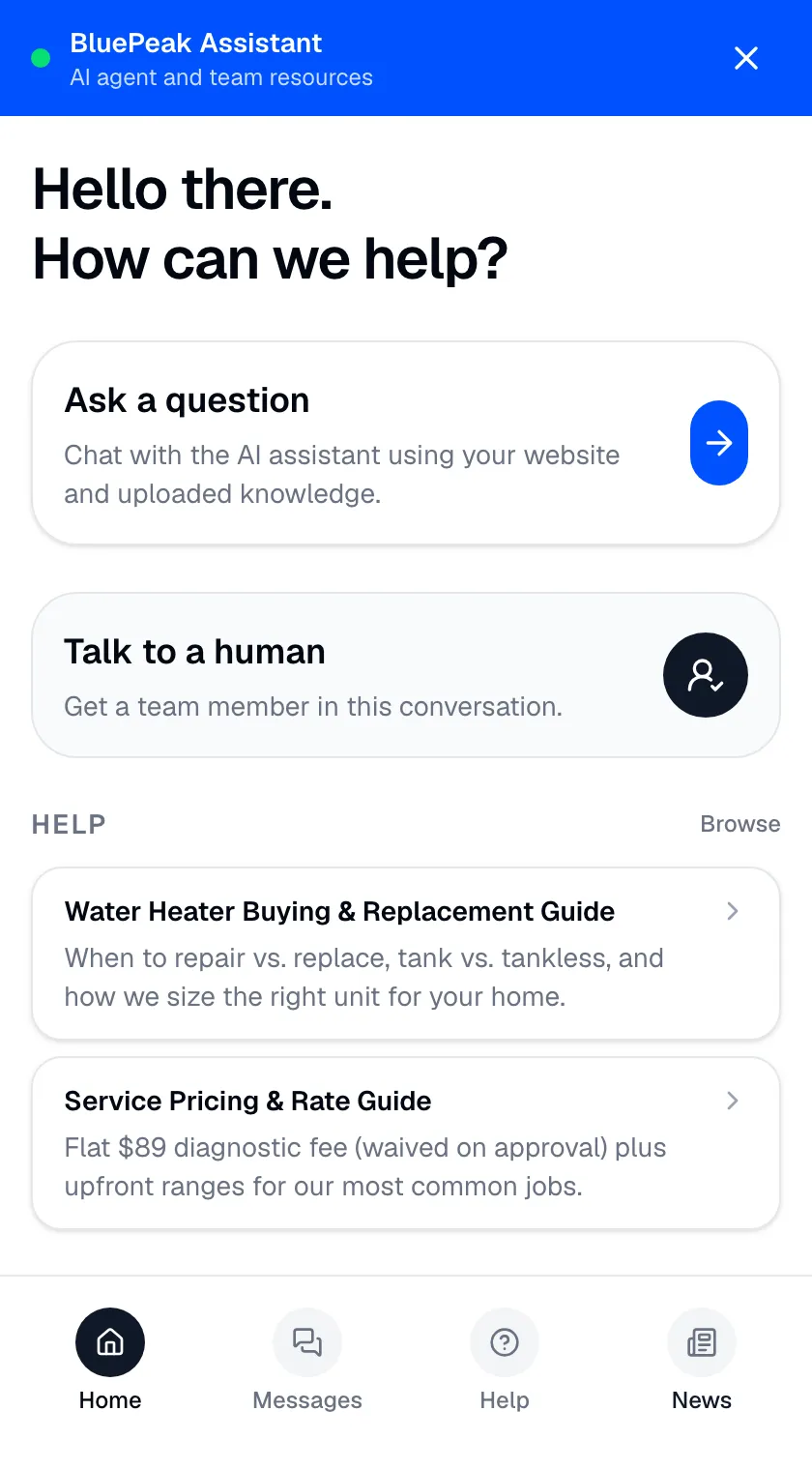
A launcher button — a small chat bubble — sits in the corner of your pages. A visitor clicks it and a panel opens onto a small, branded home view — not a blank chat box, but a place to ask a question, talk to a person, or browse help you’ve curated. It’s useful even to the visitor who never sends a message.
From there, asking a question returns an answer drawn from your own website and documents, with the source shown, so the visitor gets something accurate rather than a generic guess. See how the widget answers from your content. The whole surface is covered in detail on the chat widget feature.
Make it yours: brand color, greeting, and content.
A widget that looks bolted on gets ignored; one that looks like part of your site gets used. You set the widget’s accent color and its greeting so it opens in your voice, and you curate the help articles and news cards that live inside it. The result is a chat experience visitors read as yours — an extension of your site, not a third-party bot parked on top of it.
How do you add a chat widget to your website?
Adding the widget is a copy-paste, not a project. Drop one line of embed code — a script tag or an iframe — onto your pages and it works. It runs on WordPress, Shopify, Squarespace, Wix, Webflow, or a fully custom site, with no plugin to maintain and no data pipeline to wire up. If you can paste a line of HTML, you can run it. The snippet loads asynchronously, so it appears once your page is ready and doesn’t slow your load time.
The visitor’s experience.
- Instant answers. A visitor asks a question and gets a grounded reply from your content on the spot — no wait, no queue.
- A real person when they want one. They can ask to talk to a human, which routes the conversation into your team inbox with full context. When you reply, your name shows on your messages.
- Self-service when they’d rather read. A searchable help center and news feed inside the widget let visitors find the answer themselves.
- It holds up on mobile. The widget adapts to small screens and can go fullscreen, so the experience isn’t cramped on a phone.
An honest note on limits.
The widget answers from the content you give it, so its answers are only as good as what you feed it. It responds to the messages visitors send — it doesn’t show you who’s currently browsing your site or notify you before someone opens a conversation. Data is isolated per tenant with encryption, role-based access, and audit logs, though Zurvo does not currently hold SOC 2 or HIPAA certification — those are roadmap items, described plainly on security and control.
Where a website chat widget fits best.
- Any site that wants a fast, on-brand way for visitors to ask questions.
- Owners who want visitors to reach them directly through the widget, not a form.
- Businesses on any platform that want live chat without a plugin to babysit.
Related reading: grounded AI, explained, live chat for your website, and chat with your website visitors.
The bottom line.
A website chat widget earns its corner of the page by looking like yours, answering instantly from your content, and letting you step in to reply as yourself. Zurvo’s does all three, and installs in a single line on any platform.
See how it works, check pricing, or try it live to see the widget answer on your own content.