
Helpdesk Automation.
Helpdesk automation uses AI and workflows to answer, route, and resolve tickets. See how an AI agent that answers from your content automates the helpdesk.
Helpdesk automation is the use of AI and workflow rules to handle support tasks — answering questions, routing conversations, and resolving requests — without manual agent effort on every step, so teams clear repetitive volume faster and focus humans on complex work. It has two halves that people often conflate: automating the answering of questions, and automating the movement of conversations that still need a human. A real helpdesk automation strategy does both.
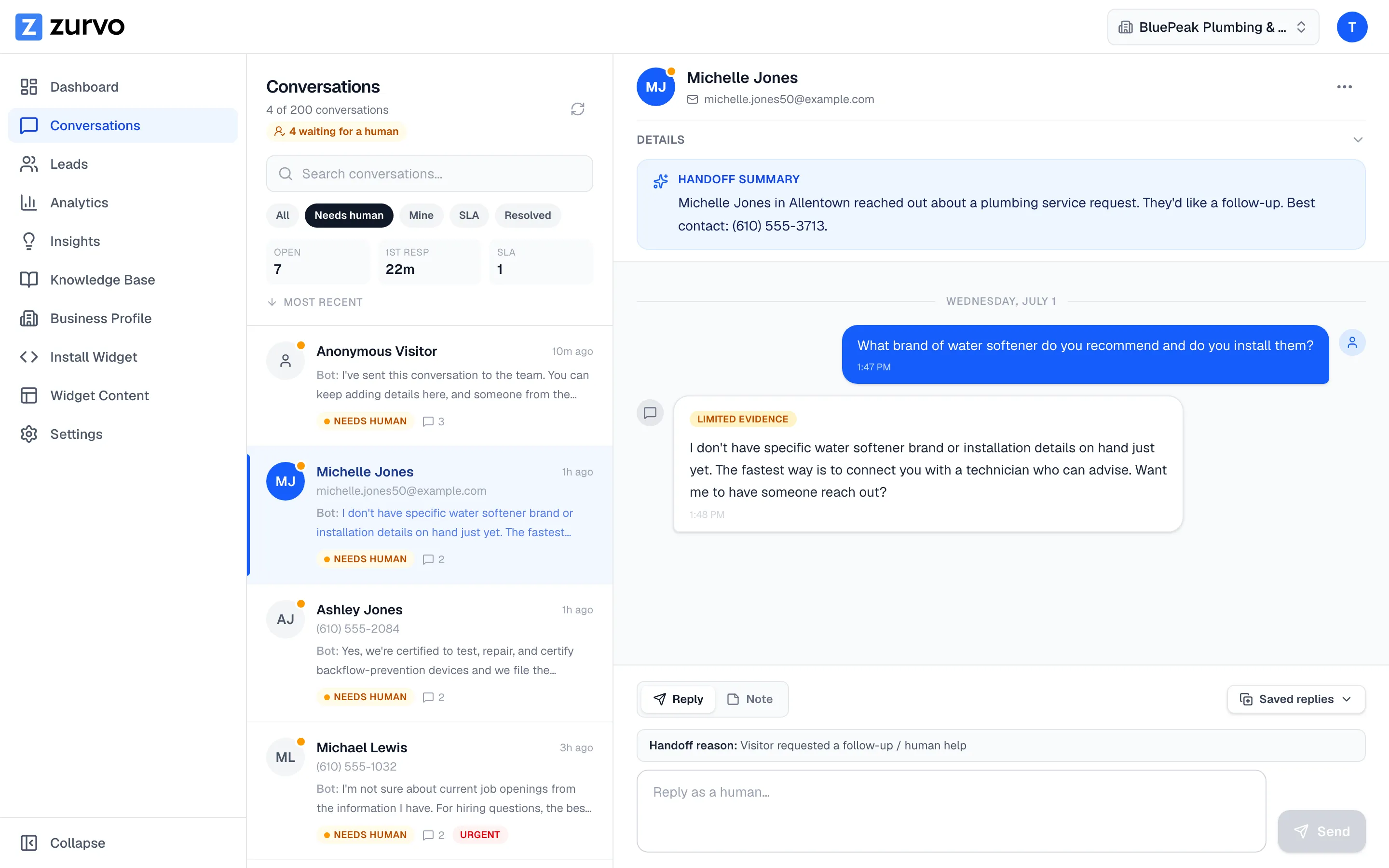
Zurvo automates the helpdesk with an AI agent that answers from your own content, shows the source behind each reply, and hands off to your team inbox when it can’t help. This page focuses on the workflow angle — answering plus routing — and how the two work together.
Two halves of helpdesk automation.
Answering. The largest source of manual effort in most helpdesks is agents typing the same answers over and over. An AI agent removes that by answering the repetitive, documented questions directly — order status, account access, plan details, troubleshooting — the moment a customer asks, any hour.
Routing. Not every conversation should be answered by the AI. The other half of automation is moving those conversations to the right place without a human triaging each one. When the agent can’t help, the workflow routes the conversation to your team inbox with everything an agent needs to resolve it fast.
Automate only the answering and your agents still drown in triage. Automate only the routing and they still type every reply. Zurvo automates both, so the helpdesk clears volume at the front and moves the rest cleanly.
Grounding keeps automated answers safe.
Automating answers is only a good idea if the answers are right. Zurvo grounds every answer in your content:
- Answers come from your approved knowledge, not the open web or a model’s guesswork.
- Sources are shown, so any automated answer can be verified — see grounded AI answers.
- The agent abstains and hands off when your content doesn’t cover a question, rather than guessing.
How helpdesk automation works with Zurvo.
- Add your knowledge. Crawl your site (100 to 1,000 pages by plan) or upload help articles, policies, and FAQs. Zurvo builds a business profile automatically and re-crawls to stay current.
- Automate the answering. The embeddable widget answers repetitive questions instantly, in your brand’s tone, with the source attached.
- Automate the routing. When a human is needed, the conversation hands off to your team inbox with the transcript and an AI summary, ready for assignment, SLA tracking, canned replies, and internal notes.
- Close the loop. AI Insights surface recurring gaps to close, and analytics show what’s answered and where handoffs happen.
The inbox is where routing pays off.
Automated routing is only as good as where it routes to. Zurvo’s team inbox is built so a routed conversation resolves fast: SLA tracking so nothing ages out, assignment so every conversation has an owner, canned replies and internal notes for consistency, and an AI-generated summary so the agent picks up with full context instead of re-reading a transcript. Your team can also be notified by email and via a Slack incoming webhook when a conversation needs them, so handoffs don’t sit unseen.
The automation improves itself over time.
A static helpdesk automation is a rulebook someone has to maintain by hand. Zurvo’s is a loop. Every conversation the agent couldn’t answer is a signal about what your knowledge base is missing, and AI Insights collect those signals into a ranked list of gaps to close. Fix the top gap, and the next wave of that question gets answered automatically instead of routed. Meanwhile analytics show whether your automated answering rate is rising and whether handoffs are trending down, so you can tell the difference between automation that’s genuinely clearing volume and automation that’s just deferring it. This is the practical difference between a helpdesk you automate once and one that keeps getting more automated as you feed it what it learns it doesn’t know.
An honest note on limits.
Zurvo automates answering and routing. It is not a general-purpose agent that executes actions in your backend — it won’t process a refund or change an order on its own, though it routes those requests to a human who can. Its answering accuracy depends on your content. The platform isolates data per tenant with encryption, RBAC, and audit logs, but does not currently hold SOC 2 or HIPAA certification — those are roadmap items, described honestly on security and control.
Automation without a re-platforming project.
The reason many helpdesk automation projects stall is that they’re framed as a migration — rip out the old system, install the new one, retrain everyone. Zurvo’s front-line automation doesn’t require that. You add it as a layer: crawl your existing content, embed the widget, and it starts deflecting and routing immediately, alongside whatever you run today. There’s no data pipeline to build, no decision tree to script, and no quarter-long implementation to schedule. That lower barrier matters because it lets you prove the value on your real volume before committing to anything larger. Start by automating the answering on your busiest question types, measure the deflection, and expand from there. Automation you can turn on in days and measure in weeks is automation your team will actually adopt — as opposed to a re-platforming initiative that competes with every other priority for a year.
Where helpdesk automation fits best.
- High-volume helpdesks where agents spend hours on repetitive answers.
- Teams whose triage overhead is as costly as the answering.
- Operations that need routed conversations to resolve fast, with context.
Related reading: customer service automation, ticket deflection, and customer support automation.
The outcome
Automating both halves of the helpdesk — answering and routing — clears repetitive volume at the front and moves the rest cleanly to a human. Fewer manual replies, faster routing, and a queue that reflects real work.
See how it works, review pricing, or try it live to see the helpdesk automated on your own content.