
Customer Service Automation.
Customer service automation handles tickets around the clock with an AI agent that draws on your knowledge base, shows its sources, and hands off to a human.
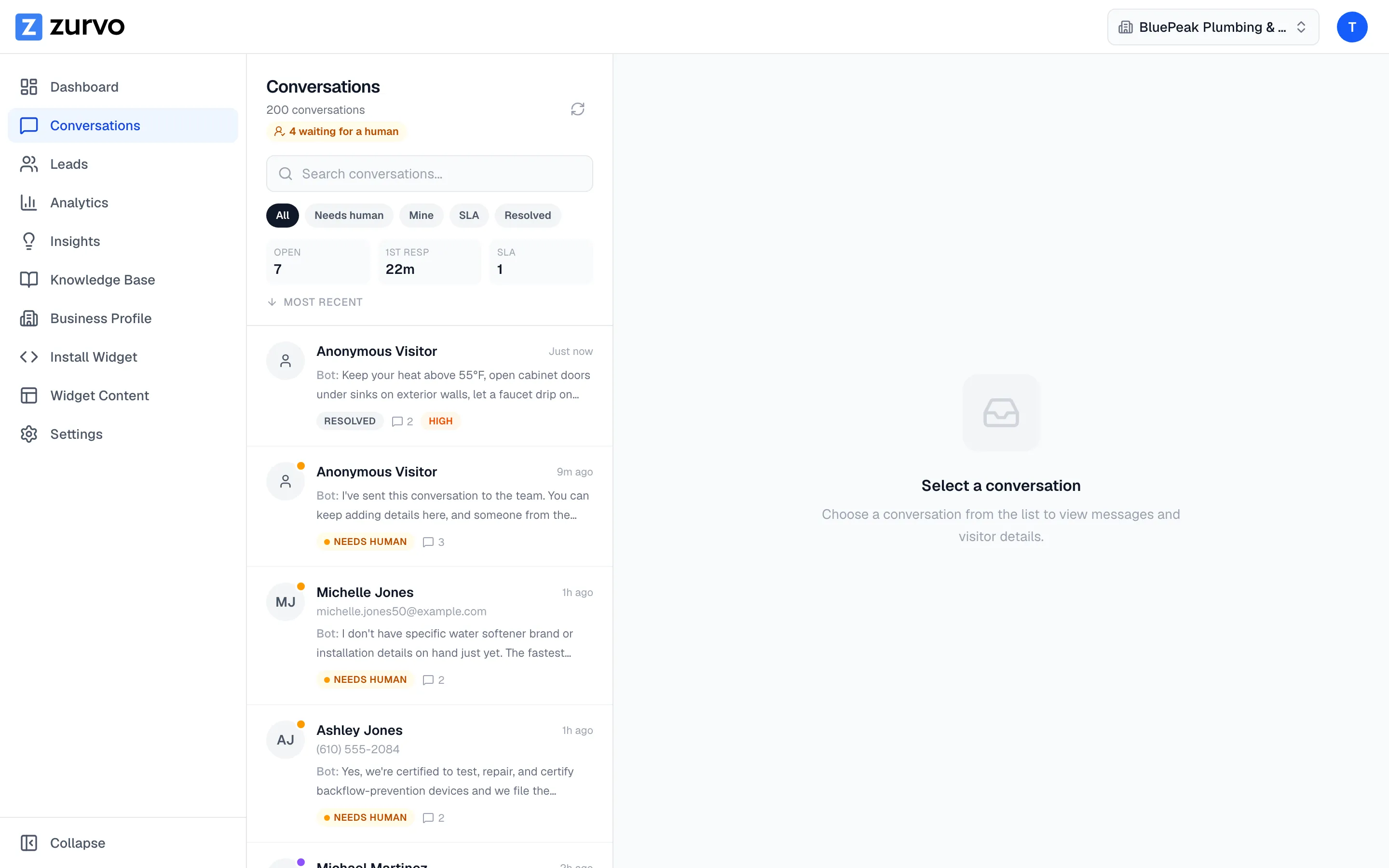
Customer service automation is the use of AI and workflow tools to answer customer questions and route conversations without a human typing every reply — handling routine inquiries instantly, deflecting tickets, and escalating to a person when judgment is required. Done well, it lifts your deflection rate while still giving customers fast, accurate answers. Done badly, it frustrates people with a bot that can’t help and won’t let them reach anyone who can.
Zurvo delivers customer service automation that answers from your own knowledge base, shows the source behind each reply, and keeps a human in the loop for anything it can’t handle. This page focuses on the operational side — how automation actually changes the flow of work through your team.
What automation changes about the flow of work.
In a fully manual operation, every question — however trivial — occupies an agent. Order status, password resets, and plan questions sit in the same queue as the genuinely hard cases, and first-response time suffers for everyone because the simple and the complex compete for the same attention.
Automation splits that flow. The repetitive, documented layer is answered by the AI agent the moment a customer asks, at any hour. Everything the agent can’t or shouldn’t handle is routed to your team with context attached. Your agents stop triaging noise and start each shift with a queue of conversations that genuinely need a human — which is where a manual operation and an automated one really diverge.
Grounding is what makes automation safe to run.
Automating a wrong answer just scales the wrong answer. That’s why Zurvo’s automation is grounded in your content, not a model’s imagination:
- Answers come from your approved knowledge — crawled pages, uploaded documents, an approved business profile — never the open web or training data.
- Sources are shown so any answer can be verified in a click. See grounded AI answers for how this works.
- The agent abstains and hands off when your content doesn’t cover a question, rather than guessing.
How customer service automation works with Zurvo.
- Add your knowledge. Crawl your website (100 to 1,000 pages by plan) or upload help articles, policy documents, and FAQs. Zurvo builds a business profile automatically and re-crawls on a schedule to stay current.
- Automate the front line. The embeddable widget answers instantly on your site, help center, or app, in your brand’s tone.
- Route the rest. When a human is needed, the conversation hands off to your team inbox with the transcript and an AI summary, ready for assignment, SLA tracking, canned replies, and internal notes.
- Improve the loop. AI Insights surface recurring gaps so you can close them, and analytics track what’s deflected and where handoffs happen.
Measuring automation honestly.
The temptation with automation is to celebrate deflection rate alone. But a deflection that leaves a customer frustrated isn’t a win — it’s a churned account you haven’t noticed yet. Watch deflection rate alongside customer satisfaction, first-response time, and resolution time. A rising deflection rate with steady satisfaction is the real signal that automation is working. Zurvo’s analytics put those numbers in one place so you can see the trade-offs, not just the flattering metric.
Automation scales with your team structure.
Customer service automation isn’t only about the AI — it’s about how the humans behind it are organized. As your operation grows, Zurvo grows with it. Team members get roles that scope what they can see and do, you can define custom roles that match how your support org is actually structured, and multi-organization support lets you separate teams, brands, or business units under one account. That matters because automation concentrates the human work onto a smaller set of complex conversations, and you want the right people owning the right queues with the right access. Sensitive actions are recorded in an audit log, so as more of the front line is automated, accountability for the human side stays clear rather than blurring.
An honest note on limits.
Zurvo automates answering and routing. It is not a general-purpose agent that executes actions in your backend — it won’t process a refund or change an order on its own. Its accuracy is a function of the content you give it. And the platform provides tenant isolation, encryption, RBAC, and audit logs, but does not currently hold SOC 2 or HIPAA certification; those are roadmap items, described plainly on security and control.
Starting small and expanding.
You don’t automate customer service in one leap. The lowest-risk path is to start with your highest-volume, most clearly documented question types — order status, account access, common how-tos — where a grounded answer is unambiguous and the upside is largest. Prove the deflection there, watch that satisfaction holds, then expand the automation to adjacent question types as your confidence and content grow. Zurvo supports this incremental approach: because the agent abstains and hands off on anything it can’t answer, expanding coverage is safe — the worst case for a not-yet-covered question is a clean handoff, not a wrong answer. AI Insights show you which question types are ready to automate next by revealing where handoffs cluster and where your content is nearly complete. Teams that treat automation as a staged rollout rather than a switch tend to end up with both higher deflection and steadier satisfaction than those that try to automate everything on day one.
Where automation delivers the most value.
- Operations with high, repetitive ticket volume and documented answers.
- Teams whose first-response time suffers because simple and complex questions share one queue.
- Businesses that want measurable deflection without risking wrong answers.
Related reading: customer support automation, helpdesk automation, and automated customer service.
The outcome
Customer service automation done right doesn’t replace your team — it changes what your team does with its day, moving them off the repetitive volume and onto the work that needs a person. Fewer routine tickets, faster answers, and a queue that finally reflects real complexity.
See how it works, review pricing, or try it live to see automation working on your own content.